Documentation Index Fetch the complete documentation index at: https://docs.morf.health/docs/llms.txt
Use this file to discover all available pages before exploring further.
Getting Started Track Google Ads conversion events directly from Morf workflows. Before you begin, you’ll need to grant Morf access to your Google Ads account.
In Google Ads
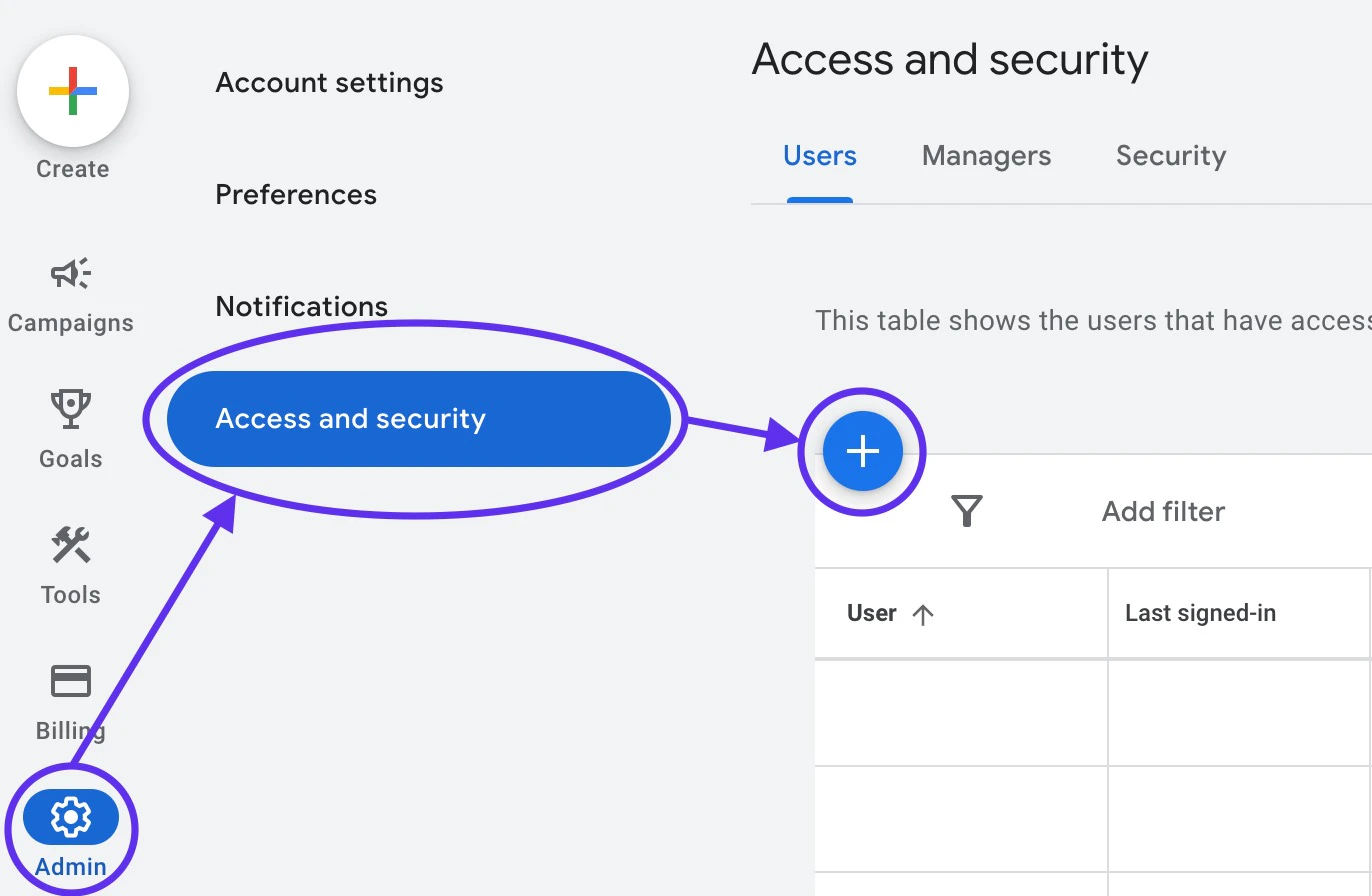
Go to your Google Ads account dashboard — not the manager account.
Navigate to Admin > Access and Security and click + to add a new user.
Fill in the following:
Email: morf-google-ads@morf-prod-5f7d.iam.gserviceaccount.comAccess Expires: NeverAccount access level: Standard
Google Ads Conversion Action Setup Learn how to create import conversion actions in Google Ads and review common troubleshooting tips.
In the Morf Dashboard
Navigate to Integrations and add a new integration.
Select Google Ads .
Enter your Google Ads account ID (found in the top-right of your Google Ads dashboard, e.g. 123-456-7891) — not the manager account ID.
You can now use the Send Conversion Event action in your workflows.
Parameters This field maps to the destination API conversionAction field.
Event Time
timing.v1.Timestamp
required
This field maps to the destination API conversionDateTime field.
ID PII
This field maps to the destination API gclid field.
ID
This field maps to the destination API gbraid field.
ID
This field maps to the destination API wbraid field.
Ad User Data Consent State
This field maps to the destination API consent.adUserData field.
Ad Personalization Consent State
This field maps to the destination API consent.adPersonalization field.
This field maps to the destination API conversionValue field.
This field maps to the destination API orderId field.
This field maps to the destination API currencyCode field.
This field maps to the destination API conversionEnvironment field.
This field maps to the destination API userIdentifiers.userIdentifierSource field.
PII
This field maps to the destination API userIdentifiers.hashedEmail field.
PII
This field maps to the destination API userIdentifiers.hashedPhoneNumber field.
ID
This field maps to the destination API userIdentifiers.thirdPartyUserId field.
This field maps to the destination API debugEnabled field.
{ "$result_object_key" : { "job_id" : "1335925420095247666" , "results" : [ { "conversion_action" : "customers/123456789/conversionActions/987654321" , "conversion_date_time" : "2025-01-17T10:57:05Z" , "gbraid" : "EAIaIQobChMI4_3o8Yze9QIVjLfICh2QaQjKEAAYASAAEgLvIPD_BwE" , "gclid" : "EAIaIQobChMI4_3o8Yze9QIVjLfICh2QaQjKEAAYASAAEgLvIPD_BwE" , "user_identifiers" : [ { "hashed_email" : "6b583232e99af45c3b436798f32800a4dd6f3524624ba6507ed8269b53ce82a3" , "hashed_phone_number" : "b49f9168e8a886ffd61a090b51a26e117717f5f6fa804af49ea67043a2bfa4f0" , "mobile_id" : "1234567890" , "source" : "THIRD_PARTY" , "third_party_user_id" : "1234567890" } ], "wbraid" : "CP7ToZIG_7oCFQsHiAkdzZoKWg" } ] } }
Result Object Description
{ "$result_object_key" : { "job_id" : "Job ID" , "results" : { "conversion_action" : "Conversion Action" , "conversion_date_time" : "Conversion DateTime" , "gbraid" : "Google Braid" , "gclid" : "Google Click ID" , "user_identifiers" : { "hashed_email" : "Hashed Email" , "hashed_phone_number" : "Hashed Phone Number" , "mobile_id" : "Mobile ID" , "source" : "User Identifier Source" , "third_party_user_id" : "Third Party User ID" }, "wbraid" : "Web Braid" } } }
Result Object Field Details You can use the result of the action’s data as inputs to downstream workflow actions.
Each fetch action requires a result object key to be specified which will nest the action’s result data inside the downstream data context in the Workflow.
Here we demonstrate how to refer to this data using the prefix $result_object_key.
GoogleAdsSendConversionEventResponse
Fetch Action Response Object
Job ID $result_object_key.job_id
Conversion Event Results $result_object_key.results
[ { "conversion_action" : "customers/123456789/conversionActions/987654321" , "conversion_date_time" : "2025-01-17T10:57:05Z" , "gbraid" : "EAIaIQobChMI4_3o8Yze9QIVjLfICh2QaQjKEAAYASAAEgLvIPD_BwE" , "gclid" : "EAIaIQobChMI4_3o8Yze9QIVjLfICh2QaQjKEAAYASAAEgLvIPD_BwE" , "user_identifiers" : [ { "hashed_email" : "6b583232e99af45c3b436798f32800a4dd6f3524624ba6507ed8269b53ce82a3" , "hashed_phone_number" : "b49f9168e8a886ffd61a090b51a26e117717f5f6fa804af49ea67043a2bfa4f0" , "mobile_id" : "1234567890" , "source" : "THIRD_PARTY" , "third_party_user_id" : "1234567890" } ], "wbraid" : "CP7ToZIG_7oCFQsHiAkdzZoKWg" } ]
Mapped array of: Google Click ID $result_object_key.results.map(x, x.gclid)
[
"EAIaIQobChMI4_3o8Yze9QIVjLfICh2QaQjKEAAYASAAEgLvIPD_BwE"
]
Mapped array of: Google Braid $result_object_key.results.map(x, x.gbraid)
[
"EAIaIQobChMI4_3o8Yze9QIVjLfICh2QaQjKEAAYASAAEgLvIPD_BwE"
]
Mapped array of: Web Braid $result_object_key.results.map(x, x.wbraid)
[
"CP7ToZIG_7oCFQsHiAkdzZoKWg"
]
results.map(x, x.user_identifiers)
Mapped array of: User Identifiers $result_object_key.results.map(x, x.user_identifiers)
[ [ { "hashed_email" : "6b583232e99af45c3b436798f32800a4dd6f3524624ba6507ed8269b53ce82a3" , "hashed_phone_number" : "b49f9168e8a886ffd61a090b51a26e117717f5f6fa804af49ea67043a2bfa4f0" , "mobile_id" : "1234567890" , "source" : "THIRD_PARTY" , "third_party_user_id" : "1234567890" } ] ]
results.map(x, x.conversion_action)
Mapped array of: Conversion Action $result_object_key.results.map(x, x.conversion_action)
[
"customers/123456789/conversionActions/987654321"
]
results.map(x, x.conversion_date_time)
[]timing.v1.Timestamp
required
Mapped array of: Conversion DateTime $result_object_key.results.map(x, x.conversion_date_time)
[
"2025-01-17T10:57:05Z"
]