
What is error branching?
Error branching in a workflow allows for graceful execution when a destination node fails. In the event of a failed node, downstream nodes on the happy path will not execute, but an error branch allows for error handling. Error branches should be used along with event monitoring to ensure proper processing.When do I use error branching?
Get notified of a credit card error
Get notified of a credit card error
Receive a custom Slack message when a credit card errors in a form.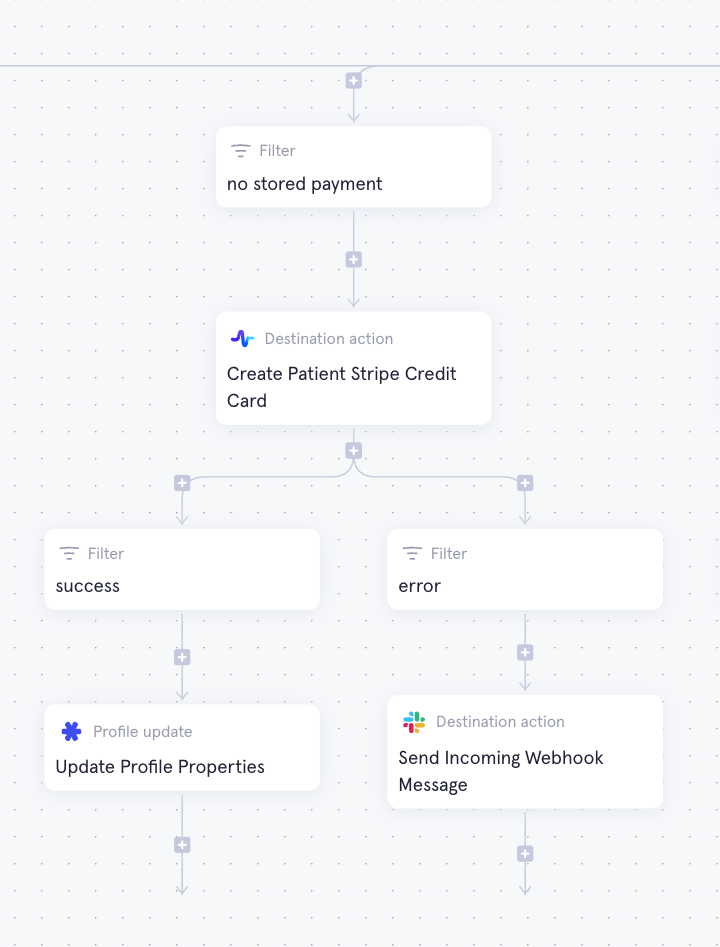
How do I add error branching?
- Select the node where error branching should happen. Go to Advanced Settings and turn Continue when this action fails on.
- Build the success branch
- Add a filter below the destination action:
!parentActionErrored() - Build out the happy path below the filter.
- Add a filter below the destination action:
- Build the error branch
- Add a branch to a filter below the destination action:
parentActionErrored() - Build out what should happen when the action fails.
- Add a branch to a filter below the destination action:
Accessing the error message
The specific error message returned by a failed node may require some CEL to access. Formatting of the error message is highly dependent on where the error is coming from. Each error message contains anissue and details:
issue— what you see on the issue monitoring page (e.g. Third party API call failed)details— the full error message body. Formatting varies depending on the source of the error.
Stripe card error example
Stripe card error example
Error message:Slack message CEL: