

Authorization Hold Endpoint (Morf Forms)
Integrate a form with Morf’s Stripe endpoint to generate a customer, card, and authorization hold from a Stripe token. Find out in real time if a credit card is eligible to charge.- A token is generated by the form builder for one-time use.
- Morf passes the token to Stripe and:
- Creates and associates a Stripe customer if one isn’t already associated with the Morf profile.
- Creates a card using the token.
- Charges and immediately refunds $1 to the card.
- The endpoint returns Stripe details, letting users know immediately that their card went through.
Inputs
morfOrgIdpatientIdstripeToken(generated in form)
Outputs
stripeCustomerIdstripePaymentSourceIdstripePaymentIntentIdstripePaymentIntentStatusmessage(only returned in the case of an error)
Morf Form Setup
Coming soon! Reach out to Morf support if you’re interested in implementing a Stripe auth hold in your Morf form.Formsort Setup
Formsort setup instructions
Formsort setup instructions
Integrate your form with Stripe
From your form, navigate to Integrations > Stripe. Add credentials for your Stripe test and live keys to their corresponding Formsort environment.Integrate Morf with Stripe
- In your Morf dashboard, navigate to Integrations and click + New Integration.
- Select Stripe and enter your Stripe access token.
- Stripe staging and production environments must each be set up in their respective Morf organizations.
Add a step for credit card entry
- Navigate to your variant and add a step for credit card collection.
- Add a payment to the step and name it
stripe_token_id. Select Stripe as the provider. - Leave all other payment settings off.
Create Formsort variables
-
morf_org_id(calculated variable) — This variable likely already exists in your form. If not, create a new calculated variable with typestringand set Blocks advancing from current step totrue. Enable Use other variables and addformsort_environment. Add the following to the Getter Function Body: -
stripe_charge_card(API variable) — APOSTrequest tohttps://questions.morf.health/api/createCustomerAndStoreCard. Configure the variable settings and API parameters per your form’s field mapping.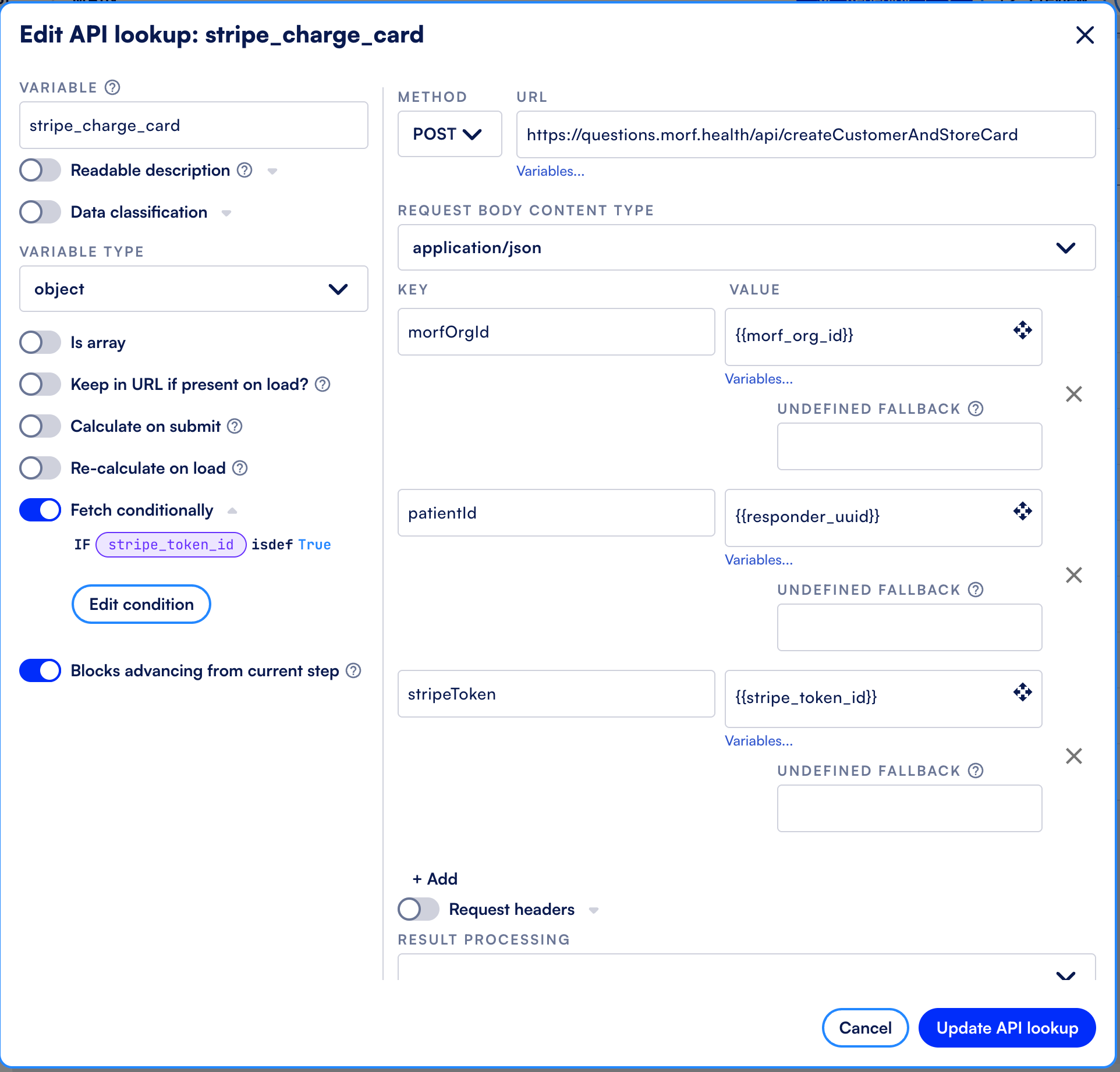
Handle credit card errors
- After the credit card collection step, add a new step for credit card errors. Users will be directed to this step if the Stripe API call fails to create the customer, card, or authorization hold.
- Under step logic, set Show conditionally to
trueand configure the condition based on thestripe_charge_cardresponse.
(Optional) Allow credit card retry
If a card fails, allow users to try a different card.Add logic and steps- Update your credit card error step to serve as a retry step. Add messaging informing the user they can try again with a different card.
- Add a payment field to the step named
stripe_token_retryand select Stripe as the provider.
-
stripe_charge_card_retry(API variable) — APOSTrequest tohttps://questions.morf.health/api/createCustomerAndStoreCard. Configure variable settings and API parameters usingstripe_token_retry. -
stripe_info(calculated variable) — Contains the most recent result of the Stripe API call. Add the following to the Getter Function Body:
true and configure the condition based on the stripe_charge_card_retry response.Workflow Action Reference
The sections below document the Create Card workflow action.Parameters
Parameters
Result Object Field Details
You can use the result of the action’s data as inputs to downstream workflow actions. Each fetch action requires an object name, which nests the action’s result data inside the downstream data context in the workflow. See Passing Data Between Actions for how to set it and reference the result from downstream nodes. Here we demonstrate how to refer to this data using the prefix$result_object_key.
Fetch Action Response Object